Seller Dashboard
The dashboard is your central hub — showing a setup checklist while your organisation is still being configured, and live stats and activity once you're up and running.
Setup Checklist
When your organisation is new or not yet fully configured, the dashboard shows a checklist. Each item deep-links to the right settings tab.
Required Items
These are required for automatic activation:
| Item | How to Complete |
|---|---|
| Organisation created | Automatically completed during onboarding |
| Seller legal status and baker declaration | Organisation → Details tab |
| Connect Stripe | Payments page. Complete onboarding so customers can pay you and you can receive payouts |
Recommended Items (Optional)
These improve matching, operations, visibility and trust. They can remain drafts; save each section and explicitly mark it complete when ready.
| Item | How to Complete |
|---|---|
| Set cake capabilities | Organisation → Capabilities tab |
| Set delivery & lead time | Organisation → Operations tab |
| Set deposit percentage | Organisation → Operations tab |
| Upload portfolio | Organisation → Portfolio tab. Add cake photos |
| Request an optional document badge | Organisation → Certification tab. Privately upload the supporting document (photo or PDF) for admin review |
Activating Your Organisation
- Once required seller details and Stripe onboarding are complete, CakeMarket activates the organisation automatically.
- A platform administrator can disable or reactivate marketplace access. There is no organisation approval queue.
Active Dashboard
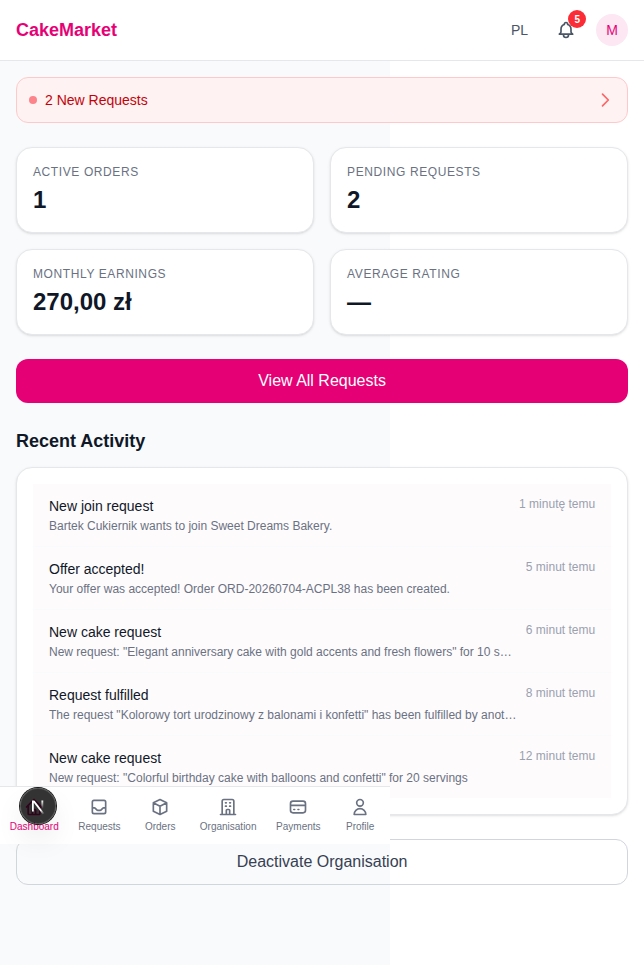
Once your organisation is active, the dashboard shows:
Stats Grid
Four key metrics displayed in a grid:
- Active Orders — Number of currently in-progress orders
- Pending Requests — Number of new requests waiting for your offer
- Monthly Earnings — This month's net earnings after commission
- Average Rating — Your rating out of 5 (or "—" if no reviews yet)
Pending Requests Alert
If you have pending requests, an alert bar appears at the top with a count and a link to the requests page (View All Requests).
Recent Activity
A feed of recent events — new requests, join requests, accepted offers, order updates — with a title, body preview and relative timestamp. Unread items are highlighted.